Mellow Display Font for Playful Web Design
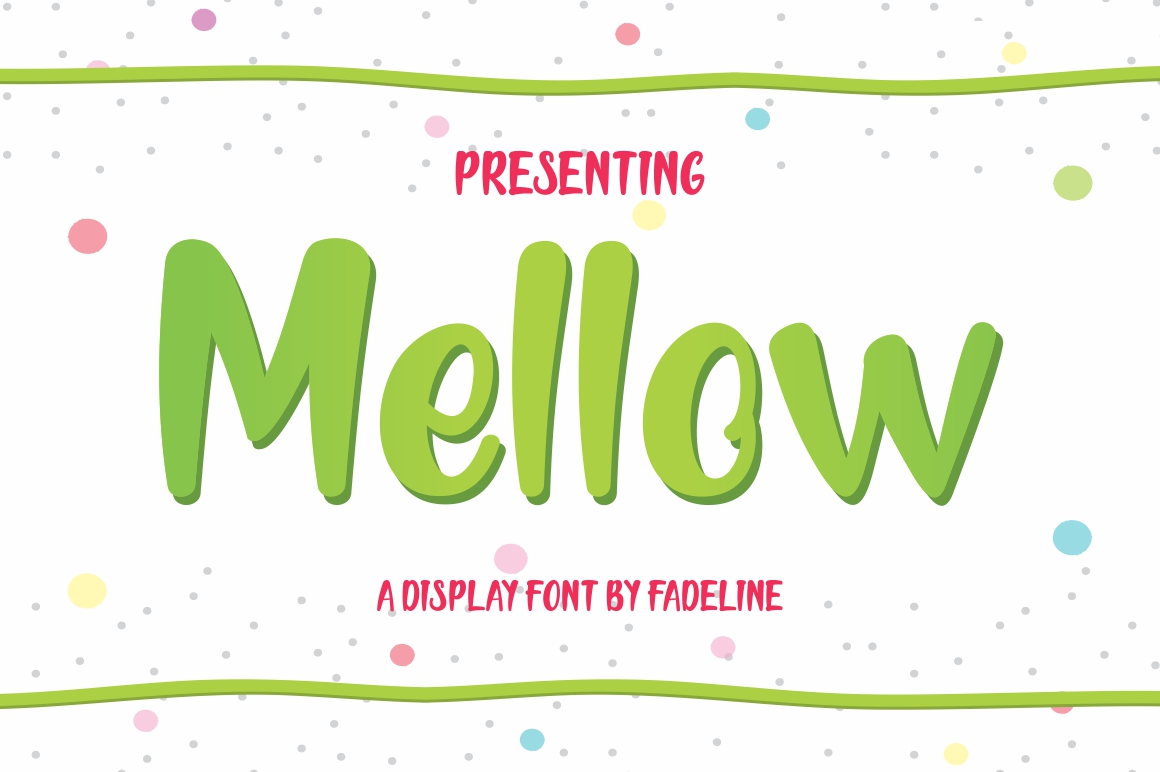
When you are building a digital experience that needs to feel approachable yet polished, Mellow stands out as a versatile choice among modern display fonts. As a web designer, I often look for typefaces that can immediately set the tone of a landing page without overwhelming the user interface. Mellow is a cute and sweet display font with a playful vibe, making it an ideal tool for brands that want to communicate warmth, creativity, and friendliness. Whether you are crafting a boutique online store, a creative portfolio, or a lifestyle blog, integrating this specific typeface into your visual hierarchy can significantly enhance the emotional connection with your audience.
Mellow for Hero Sections and Landing Page Headers
The hero section of any website is the first opportunity to capture attention, and using Mellow here can establish a welcoming atmosphere from the very first scroll. Because it is a display font, it is designed to be read at larger sizes, making it perfect for main headlines where legibility meets personality. When paired with ample white space, the soft curves and gentle aesthetic of Mellow prevent the header from feeling aggressive or corporate. For example, a wellness coach or a handmade jewelry brand can use Mellow in their H1 tags to create an immediate sense of comfort and trust. The playful nature of the font invites users to explore further, reducing bounce rates by making the entry point feel less like a sales pitch and more like an invitation.
Mellow in E-commerce Banners and Product Showcases
In the competitive world of e-commerce, visual distinction is key, and Mellow offers a unique way to break through the noise of standard sans-serif templates. Online store owners frequently struggle with creating banners that feel professional but not sterile. By applying Mellow to promotional banners, sale announcements, or product category headers, you inject a human touch into the shopping journey. The font’s sweet character works exceptionally well for seasonal campaigns, such as holiday sales or summer collections, where the goal is to evoke joy and excitement. However, it is crucial to maintain balance; use Mellow for short, impactful phrases rather than long paragraphs. This ensures that the decorative quality of the font enhances the product imagery rather than distracting from it, guiding the user’s eye toward the call-to-action buttons effectively.
Mellow for Blog Graphics and Social Media Assets
Digital content creators rely heavily on consistent branding across platforms, and Mellow provides a cohesive element for both web-based blogs and social media graphics. When designing featured images for blog posts or Instagram carousels, this display font adds a layer of editorial flair that static text lacks. Marketers can use Mellow to highlight quotes, key takeaways, or catchy headlines within graphic designs. Its playful vibe aligns well with niches like parenting, food, travel, and DIY crafts, where authenticity and charm are valued over rigid formality. By incorporating Mellow into your design assets, you create a recognizable visual identity that users associate with your brand’s friendly and accessible voice, fostering a stronger community engagement online.
Mellow in UI Elements and Call-to-Action Areas
While Mellow is primarily a display font, its application in user interface (UI) elements requires strategic consideration. It is best suited for button labels, nav bar accents, or small decorative icons where brevity is essential. Using Mellow for primary call-to-action (CTA) buttons can make them stand out against minimalist backgrounds, drawing clicks through its distinctive shape. However, readability on mobile screens must remain a priority. Ensure that the text size is large enough to be tappable and visible on smaller devices. For secondary actions or dense informational sections, it is advisable to revert to a neutral sans-serif font to maintain clarity. This contrast between the playful Mellow for emphasis and a clean body font for details creates a sophisticated rhythm that guides users through the conversion funnel without causing cognitive overload.
Mellow for Portfolio Sites and Creative Agencies
Creative professionals need their websites to reflect their artistic sensibilities, and Mellow serves as an excellent typographic signature for portfolios and agency sites. A graphic designer or illustrator can use Mellow in their "About Me" section or project titles to showcase their personality alongside their work. The font’s cute and sweet attributes suggest a designer who is detail-oriented, empathetic, and innovative. When designing case studies or service pages, using Mellow for subheadings can break up dense text and add visual interest. This approach helps potential clients see the designer as a relatable partner rather than just a vendor. The font’s versatility allows it to adapt to various project themes, from whimsical children’s book illustrations to modern tech startups looking for a softer brand image.
Mellow Font Pairing Strategies for Web Readability
To maximize the effectiveness of Mellow in web design, thoughtful font pairing is essential. Since Mellow is a decorative display font, it should be balanced with a highly readable typeface for body copy. A simple geometric sans-serif font pairs beautifully with Mellow, providing a clean backdrop that lets the headline shine without competing for attention. Alternatively, pairing Mellow with a classic serif font can create an editorial look suitable for fashion or lifestyle brands. When selecting a companion font, consider x-height and weight to ensure harmony. Avoid pairing Mellow with other decorative or script fonts, as this can clutter the layout and harm readability. The goal is to create a clear visual hierarchy where Mellow captures attention at the top, while the supporting font ensures comfortable reading throughout the rest of the page.
Technical Considerations for Implementing Mellow
Before integrating Mellow into your projects, it is important to review the technical specifications provided by the foundry. Check for available weights, webfont formats (such as WOFF2), and language support to ensure compatibility across different browsers and devices. Proper implementation involves using CSS @font-face rules to optimize loading times, which is critical for maintaining good Core Web Vitals scores. Additionally, always verify the commercial license terms if you are using Mellow for client work, online stores, or digital products. Understanding the licensing scope prevents legal issues and ensures that your use of the font aligns with ethical design practices. By paying attention to these technical details, you can leverage the aesthetic power of Mellow while delivering a fast, secure, and professional web experience.